
Looking for the best iPads for drawing? We’ve tested and picked the top 9 iPads to help you find the perfect fit for your artistic journey.
Drawing on an iPad is a game-changer for artists. It blends creativity with technology seamlessly.
The right iPad turns your ideas into stunning art. Accessories like paperfeel screen protectors and drawing gloves make it even better.
We’ve tested and picked the best iPads for drawing. This guide ensures you find the perfect fit for your artistic journey.
List of Top 9 IPads For Drawing
| Image | Title | Best For | Price |
|---|---|---|---|
 |
KCT 2 Pack Paperfeel Screen Protector for iPad A16 11th/10th & iPad Air 11 |
This screen protector is for you. It fits your iPad well. Do you like to draw? It feels like paper. It helps you write fast. It is great for kids. It is good for students. Use it to work or play. The matte film stops glare. It stays clean and clear. This pack has two. You get a spare one. It is a smart choice. Your pen will not slip. Buy it for a smooth feel. |
|
 |
Joinliyu Digital Drawing Glove 3-Layer Palm Rejection(Large,Black) Two-Finger Artist Glove for Graphics Drawing Tablet,Monitor,Sketching,ipad,Paper,Fits for Right and Left Hand |
This digital drawing glove is perfect for artists who use graphic tablets, iPads, or paper for their work. It’s great for both right and left hands and keeps your hand cool and clean while you create. |
|
|
Joinliyu Digital Drawing Glove 3-Layer Palm Rejection(Medium,Black) Two-Finger Artist Glove for Graphics Drawing Tablet,Monitor,Sketching,ipad,Paper,Fits for Right and Left Hand |
This digital drawing glove is perfect for artists who use graphic tablets, iPads, or paper for their work. It’s great for both right and left hands and keeps your hand clean and cool while you create. |
|
 |
Tovvthix Aluminum Tablet Stand for iPad Air Pro Samsung Galaxy Tab and More 9.7/10.2/10.9/11/13inch,Adjustable Portable Mountwith Wrist Rest & Pencil Holder,Drawing/Desk/Writing (Silver) |
This stand is perfect for artists, students, and tablet users who want a simple way to work in comfort. It helps anyone who needs steady support, easy angles, and a soft wrist rest while drawing or writing. |
|
 |
bersem 2 Pack Paperfeel Screen Protector for iPad Air 5/4th & Pro 11 Inch |
This Bersem Paperfeel Screen Protector is perfect for iPad users who want a natural, paper-like feel while writing or drawing. It’s ideal for those who love reading or working on their iPad without glare or fingerprints. |
|
 |
Qulkws 2Pcs Digital Drawing Glove, Drawing Glove Palm Rejection |
The Qulkws 2Pcs Digital Drawing Glove is perfect for digital artists who want a smooth, friction-free drawing experience. It’s great for anyone who needs precision and wants to avoid accidental touches on their screen. These gloves keep your hands cool and comfortable during long sessions and are easy to carry wherever you go. |
|
 |
KCT 2 Pack Paperfeel Glass Screen Protector for iPad Air 11 Inch M4/M3/M2 |
This KCT Paperfeel Glass Screen Protector is perfect for iPad Air 11 users who want smooth writing and strong protection. It’s great for creators, students, and professionals who work indoors or outdoors. |
|
 |
Hand Lettering on the iPad with Procreate: Ideas and Lessons for Modern and Vintage Lettering |
This eBook is perfect for anyone who loves hand lettering and wants to learn modern and vintage styles using Procreate on the iPad. It’s great for beginners and experienced artists alike. |
Detailed Reviews
Discover the top 9 iPads for drawing, carefully selected based on expert reviews and customer feedback. Each product is evaluated for features, performance, and value, ensuring you find the perfect fit. Whether you prioritize comfort or affordability, this guide simplifies your choice. Dive in to unlock the best iPad for your creative needs and start drawing with confidence.
1. KCT 2 Pack Paperfeel Screen Protector for iPad A16 11th/10th & iPad Air 11
Turn your iPad into a real paper notebook today. This paperfeel screen protector stops harsh screen glare and ugly smudges. You can now draw and write easily anywhere you go.
The micro-grit surface gives your stylus the perfect grip. It works with the iPad Air 11 and iPad 10th gen.
The ultra-thin design keeps your touch screen fast and exact. You can install it fast without any air bubbles.
| Pros | Cons |
|---|---|
|
|
Perfect For:
This screen protector is for you. It fits your iPad well. Do you like to draw? It feels like paper. It helps you write fast. It is great for kids. It is good for students. Use it to work or play. The matte film stops glare. It stays clean and clear. This pack has two. You get a spare one. It is a smart choice. Your pen will not slip. Buy it for a smooth feel.
Ready to Purchase?
2. Joinliyu Digital Drawing Glove 3-Layer Palm Rejection(Large,Black) Two-Finger Artist Glove for Graphics Drawing Tablet,Monitor,Sketching,ipad,Paper,Fits for Right and Left Hand
Joinliyu Digital Drawing Glove is made for artists. It stops accidental touches on tablets. The glove fits both right and left hands.
It has three layers to keep your hand cool and clean. The soft fabric glides smoothly on screens.
| Pros | Cons |
|---|---|
|
|
Perfect For:
This digital drawing glove is perfect for artists who use graphic tablets, iPads, or paper for their work. It’s great for both right and left hands and keeps your hand cool and clean while you create.
Ready to Purchase?
3. Joinliyu Digital Drawing Glove 3-Layer Palm Rejection(Medium,Black) Two-Finger Artist Glove for Graphics Drawing Tablet,Monitor,Sketching,ipad,Paper,Fits for Right and Left Hand
Draw with ease. This glove fits well. It feels smooth.
The thick layer stops marks. Your palm stays clean.
It fits your hand. Use it to create.
| Pros | Cons |
|---|---|
|
|
Perfect For:
This digital drawing glove is perfect for artists who use graphic tablets, iPads, or paper for their work. It’s great for both right and left hands and keeps your hand clean and cool while you create.
Ready to Purchase?
4. Tovvthix Aluminum Tablet Stand for iPad Air Pro Samsung Galaxy Tab and More 9.7/10.2/10.9/11/13inch,Adjustable Portable Mountwith Wrist Rest & Pencil Holder,Drawing/Desk/Writing (Silver)
This sleek aluminum stand is built to last. It fits tablets from 9.7 to 13 inches perfectly.
It folds quickly for easy travel. The base won’t slip on your desk. You can adjust it to three angles for the best view.
The soft wrist rest keeps you comfortable. A pencil holder keeps your tools close. This stand makes your workspace neat and easy.
| Pros | Cons |
|---|---|
|
|
Perfect For:
This stand is perfect for artists, students, and tablet users who want a simple way to work in comfort. It helps anyone who needs steady support, easy angles, and a soft wrist rest while drawing or writing.
Ready to Purchase?
5. bersem 2 Pack Paperfeel Screen Protector for iPad Air 5/4th & Pro 11 Inch
The Bersem 2 Pack Paperfeel Screen Protector is specially designed for iPad Air 5/4 and Pro 11 Inch models. It fits perfectly and protects your screen from scratches and smudges.
Paperfeel texture mimics real paper, making writing and drawing smooth and natural. Anti-glare and anti-fingerprint features keep your screen clear and clean.
Easy to install with automatic adsorption and bubble-free application. High sensitivity ensures smooth touch and realistic colors for a better viewing experience.
| Pros | Cons |
|---|---|
|
|
Perfect For:
This Bersem Paperfeel Screen Protector is perfect for iPad users who want a natural, paper-like feel while writing or drawing. It’s ideal for those who love reading or working on their iPad without glare or fingerprints.
Ready to Purchase?
6. Qulkws 2Pcs Digital Drawing Glove, Drawing Glove Palm Rejection
The Qulkws 2Pcs Digital Drawing Glove is perfect for digital artists. It keeps your palm from smudging the screen while you create.
Made from soft, breathable fabric, it’s lightweight and easy to carry. Fits both hands and works with all devices.
| Pros | Cons |
|---|---|
|
|
Perfect For:
The Qulkws 2Pcs Digital Drawing Glove is perfect for digital artists who want a smooth, friction-free drawing experience. It’s great for anyone who needs precision and wants to avoid accidental touches on their screen. These gloves keep your hands cool and comfortable during long sessions and are easy to carry wherever you go.
Ready to Purchase?
7. KCT 2 Pack Paperfeel Glass Screen Protector for iPad Air 11 Inch M4/M3/M2
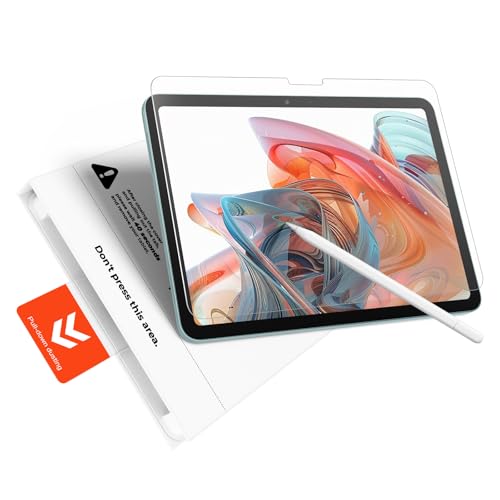
This screen protector fits the iPad Air 11 inch with a clean, smooth hold. It applies fast with a simple press and pull.
Writing feels like paper. Glare stays low. Your screen stays safe.
| Pros | Cons |
|---|---|
|
|
Perfect For:
This KCT Paperfeel Glass Screen Protector is perfect for iPad Air 11 users who want smooth writing and strong protection. It’s great for creators, students, and professionals who work indoors or outdoors.
Ready to Purchase?
8. Hand Lettering on the iPad with Procreate: Ideas and Lessons for Modern and Vintage Lettering
Learn hand lettering right on your iPad. Artist Liz Kohler Brown shows you how. You will master both modern and vintage styles.
This ebook has 378 pages of clear tips. It is packed with illustrated lessons for everyone. You can start creating beautiful art today.
Get your copy on Kindle right now. Unlock your creative skills with Procreate.
| Pros | Cons |
|---|---|
|
|
Perfect For:
This eBook is perfect for anyone who loves hand lettering and wants to learn modern and vintage styles using Procreate on the iPad. It’s great for beginners and experienced artists alike.
Ready to Purchase?
Buying Guide
Drawing on an iPad is fun and easy. It lets you create art anywhere.
Engaging Experience:
With the right iPad and accessories, your ideas turn into stunning art. Paperfeel screen protectors and drawing gloves make it feel like real paper.
Factors to Consider When Buying:
– Screen Size: Bigger screens give more space to draw. Choose 11-inch for pro work or 10-inch for portability.
– Processor Speed: A fast processor keeps apps smooth. Look for M1 or M2 chips for top performance.
– Apple Pencil Support: Ensure the iPad works with Apple Pencil. It’s key for precise drawing.
– Storage: More storage means more art files. Get 128GB or more for big projects.
– Battery Life: Long battery life lets you draw all day. Look for 10+ hours of use.
– Accessories: Add-ons like gloves and stands boost your experience. Pick ones that fit your iPad.