
Looking for the best iPads for note taking?
This guide gives you clear picks and helpful tips to create a smooth, enjoyable note‑taking experience.
Note-taking on an iPad has changed how we capture ideas. Whether you’re a student, professional, or creative thinker, the right tools make all the difference. This guide will help you find the best iPad for your needs.
We’ve tested and compared top iPads and accessories to bring you the perfect setup. From Apple Pencil precision to screen protectors that feel like paper, we’ve got you covered. Get ready to boost your productivity and organize your notes like never before.
Discover the best iPads for note-taking, top accessories, and expert tips. Start your journey to mastering iPad note-taking today!
List of Top 10 IPads For Note Taking
| Image | Title | Best For | Price |
|---|---|---|---|
 |
iPad Note-Taking Mastery: The Complete System for Professionals, Students, and Creative Thinkers |
iPad Note-Taking Mastery is perfect for anyone who wants to take better notes on their iPad. Whether you’re a student, professional, or creative thinker, this complete system will help you organize your thoughts and boost productivity. |
|
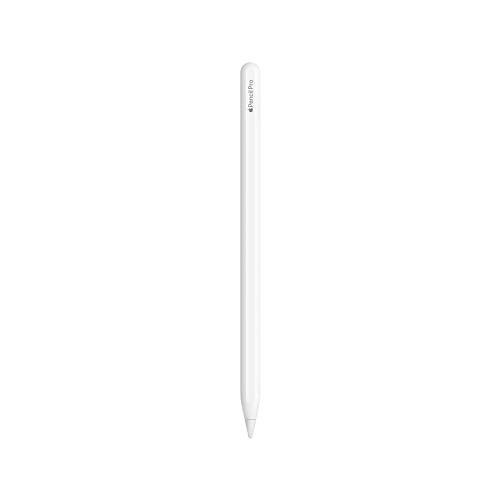 |
Apple Pencil Pro: Latest Model – Device Compatibility Check Required – Pixel-Perfect Precision, Tilt and Pressure Sensitivity, Perfect for Note-Taking, Drawing, and Art. Charges and Pairs Magnetically |
The Apple Pencil Pro is perfect for anyone who loves to draw, sketch, take notes, or mark up documents. It’s great for artists, students, and professionals looking for precise control and natural creativity. |
|
 |
iPad Notes Made Simple: The Complete Manual for Capturing, Organizing, and Using Your Notes Like a Pro |
This ebook is perfect for iPad users who want to master note-taking. It’s easy to follow and great for beginners. |
|
 |
3PCS Tablets Stylus Pen for All Touchscreen Devices with Precision Disc Tip |
This stylus pen is perfect for anyone who uses touchscreen devices like tablets or smartphones. Whether you’re writing, drawing, or taking notes, it’s easy to use and protects your screen. |
|
 |
YITIAOXIAOYU 10PCS Stylus Pen for Touchscreen,Lightweight 2 in 1 Design |
This set is perfect for students, artists, and professionals who want a smooth, easy, and precise way to work on any touchscreen. It’s great for anyone who needs a light, comfortable, and ready-to-use stylus every day. |
|
 |
BELLEMOND Paper Screen Protector for iPad Pro 11 M5/M4, 2 Pack |
This BELLEMOND Paper Screen Protector is perfect for digital writers, students, and creators who want a natural paper-like feel when using their iPad Pro 11. It’s great for long writing or drawing sessions, reducing glare and improving control. |
|
 |
Apple Pencil (USB-C): Palm Rejection Pixel-Perfect Precision, Tilt Sensitivity, Good for Note-Taking, Drawing, and Signing Documents, Works for iPad 2018-2025, White |
The Apple Pencil (USB-C) is perfect for students, artists, and professionals who want to take notes, draw, or sign documents with precision and ease. It’s great for anyone using compatible iPads and needs a reliable, durable tool for digital work. |
|
 |
BELLEMOND Kent Paper Screen Protector for iPad Air 11 M4/M3/M2, 2 Pack |
This screen protector is perfect for artists and writers who use their iPad Air with an Apple Pencil. It offers a smooth, paper-like feel that’s great for drawing, writing, and note-taking. |
|
 |
YOUPECK Note Pro Pencil for iPad with 2X Fast Charge |
The YOUPECK Note Pro Pencil is perfect for anyone who uses an iPad. Whether you’re a student, artist, or professional, this pencil works right out of the box with all iPad models from 2018 to 2026. |
|
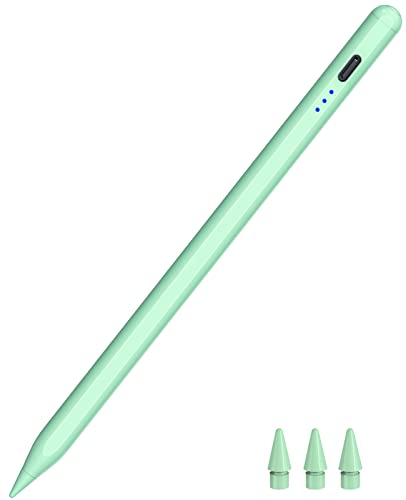 |
HATOKU Stylus Pen for Apple iPad 2018-2026 for Note-Taking Drawing Green |
This pen is perfect for students, artists, and busy workers who want smooth, fast, and easy writing on an iPad. It’s great for anyone who needs a simple, precise, and affordable tool for notes or drawing. |
Detailed Reviews
Discover the top 10 iPads for note-taking, handpicked for professionals, students, and creatives. Each iPad is reviewed for performance, features, and value, ensuring you find the perfect fit. Whether you prioritize comfort, affordability, or precision, this guide has you covered. Dive in to find your ideal iPad and elevate your note-taking game today!
1. iPad Note-Taking Mastery: The Complete System for Professionals, Students, and Creative Thinkers
iPad Note-Taking Mastery is a step-by-step guide to improve your note-taking skills. Written by Ryouji Nakamura, it’s packed with practical tips for all levels. This 127-page eBook is easy to follow and quick to read.
It’s designed for professionals, students, and creative minds. Learn how to organize notes and boost productivity. The system works seamlessly with your iPad.
Available on June 27, 2026, in English. Perfect for anyone wanting to take notes like a pro.
| Pros | Cons |
|---|---|
|
|
Perfect For:
iPad Note-Taking Mastery is perfect for anyone who wants to take better notes on their iPad. Whether you’re a student, professional, or creative thinker, this complete system will help you organize your thoughts and boost productivity.
Ready to Purchase?
2. Apple Pencil Pro: Latest Model – Device Compatibility Check Required – Pixel-Perfect Precision, Tilt and Pressure Sensitivity, Perfect for Note-Taking, Drawing, and Art. Charges and Pairs Magnetically
The Apple Pencil Pro is new. It works with iPad. You can draw fast.
Squeeze the tool to work. Feel it vibrate now.
It stays on your tablet. It charges with no wires.
| Pros | Cons |
|---|---|
|
|
Perfect For:
The Apple Pencil Pro is perfect for anyone who loves to draw, sketch, take notes, or mark up documents. It’s great for artists, students, and professionals looking for precise control and natural creativity.
Ready to Purchase?
3. iPad Notes Made Simple: The Complete Manual for Capturing, Organizing, and Using Your Notes Like a Pro
iPad Notes Made Simple shows you how to take clear notes fast. It helps you keep every idea in one safe place. It makes your notes easy to find and use.
This guide gives you simple steps you can follow right away. It shows you how to organize your notes with ease. It helps you work smarter each day.
You learn fast. You stay organized.
| Pros | Cons |
|---|---|
|
|
Perfect For:
This ebook is perfect for iPad users who want to master note-taking. It’s easy to follow and great for beginners.
Ready to Purchase?
4. 3PCS Tablets Stylus Pen for All Touchscreen Devices with Precision Disc Tip
This stylus set gives you smooth control on any touchscreen. Each pen is light, easy to hold, and ready to use with no charging needed.
It works on many devices. It feels soft on your screen. It writes with high precision.
You get three colors at a great price. The soft disc tip keeps your screen safe and clean.
| Pros | Cons |
|---|---|
|
|
Perfect For:
This stylus pen is perfect for anyone who uses touchscreen devices like tablets or smartphones. Whether you’re writing, drawing, or taking notes, it’s easy to use and protects your screen.
Ready to Purchase?
5. YITIAOXIAOYU 10PCS Stylus Pen for Touchscreen,Lightweight 2 in 1 Design
The YITIAOXIAOYU stylus pen is lightweight and easy to hold. It has a 2-in-1 design with a soft rubber tip and a clear disc tip for precise touch. You get 10 pens in black and white, perfect for sharing or backup.
This pen works on many devices like iPads, phones, and tablets. It needs no charging and is ready to use anytime.
| Pros | Cons |
|---|---|
|
|
Perfect For:
This set is perfect for students, artists, and professionals who want a smooth, easy, and precise way to work on any touchscreen. It’s great for anyone who needs a light, comfortable, and ready-to-use stylus every day.
Ready to Purchase?
6. BELLEMOND Paper Screen Protector for iPad Pro 11 M5/M4, 2 Pack
The BELLEMOND protector is made in Japan. It is built for serious writers and creators. You get precision, consistency, and durability.
Enjoy a true paper feel when you write. The matte PET mimics real paper. It keeps full sensitivity and smooth strokes.
This protector reduces glare and fingerprints. It includes a 2 pack with easy installation tools.
| Pros | Cons |
|---|---|
|
|
Perfect For:
This BELLEMOND Paper Screen Protector is perfect for digital writers, students, and creators who want a natural paper-like feel when using their iPad Pro 11. It’s great for long writing or drawing sessions, reducing glare and improving control.
Ready to Purchase?
7. Apple Pencil (USB-C): Palm Rejection Pixel-Perfect Precision, Tilt Sensitivity, Good for Note-Taking, Drawing, and Signing Documents, Works for iPad 2018-2025, White
The Apple Pencil (USB-C) makes writing and drawing simple. It offers pixel-perfect precision for every stroke. This tool feels natural and fast to use.
Enjoy tilt sensitivity for shading and low latency for smooth work. You can rest your hand on the screen thanks to palm rejection. It pairs and charges easily with USB-C.
The pencil attaches magnetically to your iPad. It charges quickly and lasts long.
| Pros | Cons |
|---|---|
|
|
Perfect For:
The Apple Pencil (USB-C) is perfect for students, artists, and professionals who want to take notes, draw, or sign documents with precision and ease. It’s great for anyone using compatible iPads and needs a reliable, durable tool for digital work.
Ready to Purchase?
8. BELLEMOND Kent Paper Screen Protector for iPad Air 11 M4/M3/M2, 2 Pack
Write better on your iPad. It feels like real paper.
This screen protector stops glare. It protects your glass screen. The pen will not slip.
You get two pieces here. They are easy to put on. Buy your pack now.
| Pros | Cons |
|---|---|
|
|
Perfect For:
This screen protector is perfect for artists and writers who use their iPad Air with an Apple Pencil. It offers a smooth, paper-like feel that’s great for drawing, writing, and note-taking.
Ready to Purchase?
9. YOUPECK Note Pro Pencil for iPad with 2X Fast Charge
The YOUPECK Note Pro Pencil is a fast-charging iPad stylus that works with all iPads from 2018 to 2026. It has a 3-light battery indicator so you always know when to charge. This affordable Apple Pencil alternative is perfect for students, artists, and professionals.
It offers pixel-perfect tilt sensitivity and palm rejection for natural writing and drawing. With no Bluetooth or apps needed, it’s ready to use right out of the box.
| Pros | Cons |
|---|---|
|
|
Perfect For:
The YOUPECK Note Pro Pencil is perfect for anyone who uses an iPad. Whether you’re a student, artist, or professional, this pencil works right out of the box with all iPad models from 2018 to 2026.
Ready to Purchase?
10. HATOKU Stylus Pen for Apple iPad 2018-2026 for Note-Taking Drawing Green
The HATOKU Stylus Pen works with many iPad models. It is fast to charge and has magnetic hold on some devices. It is made for smooth writing and easy note-taking.
It gives precise control with tilt support and palm rejection. It is a good Apple Pencil alternative for study, work, and drawing.
| Pros | Cons |
|---|---|
|
|
Perfect For:
This pen is perfect for students, artists, and busy workers who want smooth, fast, and easy writing on an iPad. It’s great for anyone who needs a simple, precise, and affordable tool for notes or drawing.
Ready to Purchase?
Buying Guide
Note-taking on an iPad is easy and fun. The right tools make it even better.
Choosing the best iPad for note-taking can be exciting. You get to explore cool features and find what works best for you. Here are some key factors to consider:
- Screen Size: A bigger screen gives you more space to write and draw. Smaller screens are easy to carry.
- Apple Pencil Support: Look for iPads that work with the Apple Pencil. It makes writing and drawing feel natural.
- Processor Speed: A fast processor helps apps run smoothly. This is key for note-taking apps.
- Storage: More storage means you can keep more notes and files. Choose based on your needs.
- Battery Life: Long battery life lets you work without worrying about charging.
- Price: iPads come at different prices. Pick one that fits your budget.
- Accessories: Think about screen protectors and stylus pens. They can improve your note-taking experience.